how to change the defaults of formatting

When I add a new topic or subtopic to a mind map, the font and font size always default to Courier 9. How can that be changed? Is there such a thing as a style sheet where one can assign the font characteristic for various levels of an outline?
Thanks,
Christopher
-

Have you figured out how to do this?
I keep ending up with this Roboto Slab font and while I can manually change the central topic, branches or leaves to use say Arial, I have to do it EVERY time.
The schema for Styles and Templates is very well documented or intuitive. I bet there's a way to do it there, but I haven't figured out an EASY way to create a 'look' I like - Background Colors, Shape Colors, Font - Types, Colors, Sizes etc and be able to create new maps that use these things.
Back when it was free I'd say you get what you pay for - But now I am paying for something and it kinda sucks
-

a simple way, but you need administration permission.
please follow me.
1 - under the installation path of xmind. for my computer is: C:\Program Files (x86)\XMind\plugins\org.xmind.ui.resources_3.7.9.201912052356\styles
then you could find a file: theme.xml.
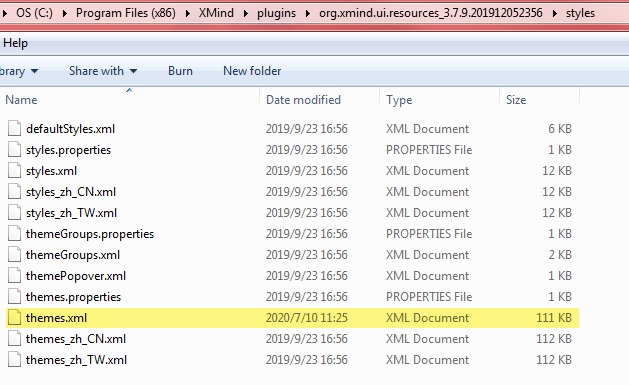
2 - please open it by notepad.
3 - search and replace the font to what you want.
for example, I change the font from "Robot Slab" to "Arial".

enjoy it
-

Unfortunately, it looks like they've changed the configuration. In my installation path of xmind, I couldn't find a plugins folder or any XML files. My default font is currently stuck at "Arvo" and I couldn't even find that word when I searched the install path.
Does anyone have any other suggestions? Thanks a lot.
-

I find a way to get around with setting up a Theme inside XMind. Click Tools > Create/Customize Theme. Then create new Theme. Inside, there is customization for each component. If it is font-specific, just go for Overall tab, and edit font. This step will affect the font of all elements in Mindmap.
P/s: I confirm that finding XML files in root folder does not work anymore.

Bitte melden Sie sich an, um einen Kommentar zu hinterlassen.
Kommentare
4 Kommentare