Adding levels of styling to xmind-2020 custom templates

Hey,
Using xmind 2020 here. I'm using the custom templates, which are great. However there's one thing that seems to be missing (along with all default templates available) - adding more than just 3 layers of syling.
What I mean is this:
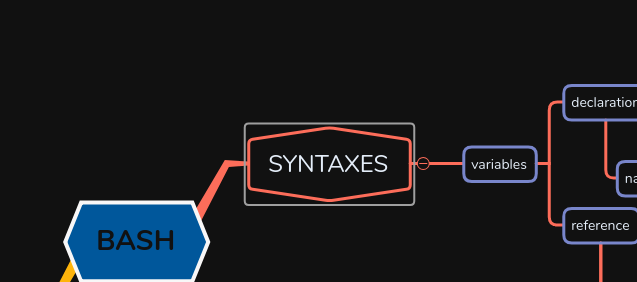
Below "variables", I can only have the same styling as that level to all branches that come below it.
I also tend to use floating topics a fair bit, and for those that means you're stuck with only 2 levels of styling:

I've spend a fair bit of time trying to find a way to do that in the templating tool, so I'm pretty sure you just can't. I DO NOT want to manually style sublevels everytime either (sort of undermine the purpose of using templates).
So..... I was thinking I might be able to make that work somehow if I could where WHERE are the source files that define my the custom templates. Xmind has to save that somewhere. If that format is open (e.g. xml or json or something), or some collection of text files, I'm could probably make it work. Obviously not if it's compiled though.
So where (directory name) are xmind-2020 custom templates definitions stored?

Bitte melden Sie sich an, um einen Kommentar zu hinterlassen.
Kommentare
1 Kommentar